Appearance
Dashboard
The dashboard is the first screen after logging in. It summarizes pending items for the user's current project and company.
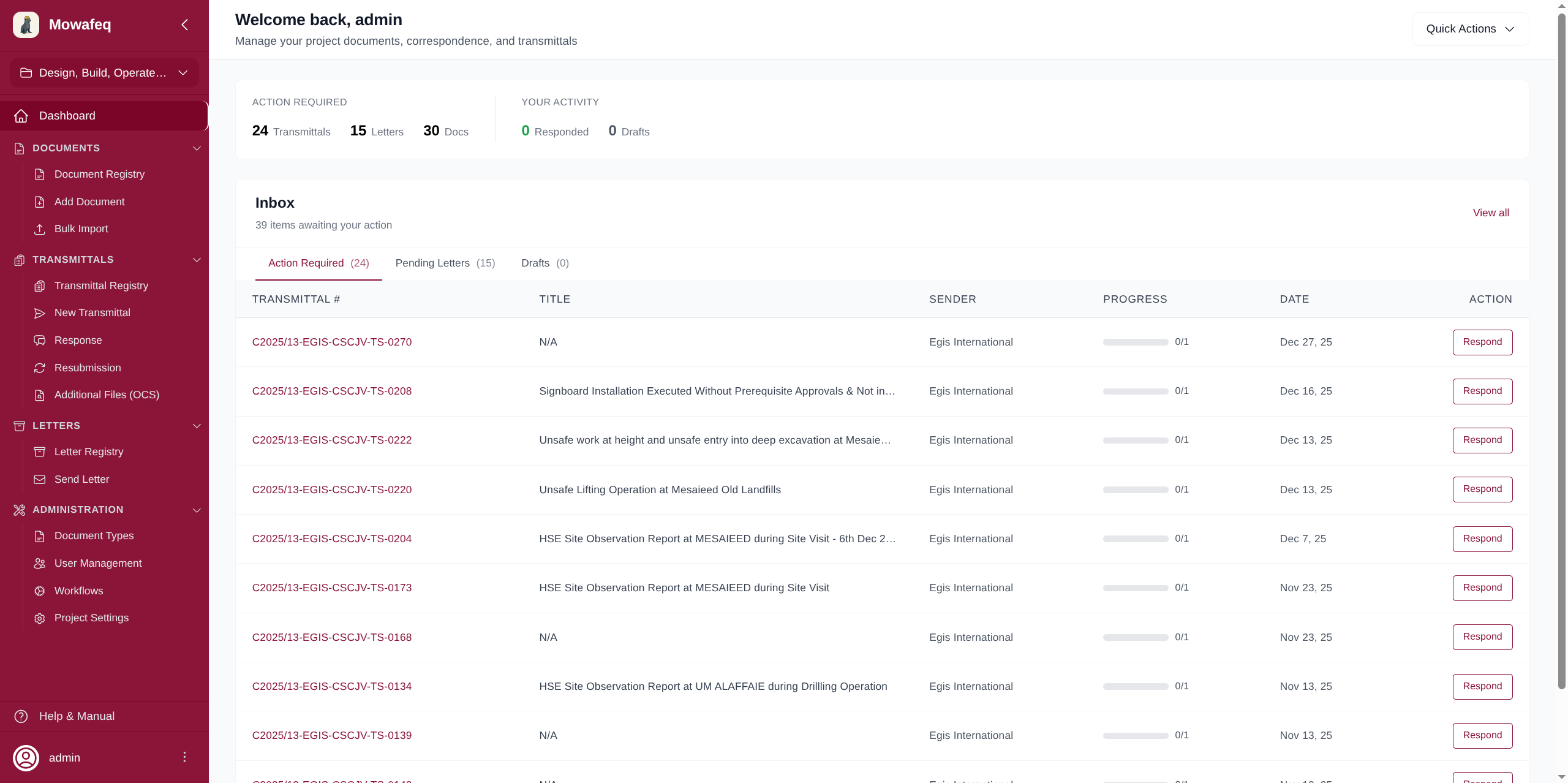
Metrics Card
Displays at the top of the page with two sections:
Action Required
- Transmittals: Number of received transmittals awaiting a response from your company.
- Letters: Number of received letters awaiting a response.
- Docs: Total individual documents pending a response across all pending transmittals.
Your Activity
- Responded: Total documents your company has already responded to.
- Drafts (Document Controllers only): Number of draft transmittals saved by your company.
Inbox
A tabbed area labeled "N items awaiting your action".
Action Required Tab
Lists received transmittals that need a response:
- Columns: Transmittal #, Title, Sender, Progress (visual bar showing responded vs. total documents), Date, Action.
- Progress bar colors: green = fully responded, amber = less than 25% responded, maroon = partially responded.
- Click "Respond" to begin creating a response transmittal.
- Click anywhere on the row to view the transmittal details.
Pending Letters Tab
Lists received letters needing a response:
- Shows: Letter reference number, Subject, Sender, Date.
- Click a row to view the letter details.
Drafts Tab (Document Controllers only)
Lists draft transmittals:
- Columns: Transmittal #, Title, Receivers count, Date.
- Click a row to resume editing the draft.
- "View all" navigates to the transmittal registry filtered to drafts.
All tabs paginate at 5 items per page with Previous/Next navigation. A "Full Registry" link at the bottom navigates to the complete registry.
Inbox visibility by role:
- Document Controllers see all unprocessed correspondence (items with no workflow started), items with workflow steps assigned to them, and items with completed workflows that still need a response.
- Regular Users see only items where they have an active, un-submitted workflow step assigned to them.
Quick Actions
A dropdown button in the page header with shortcuts:
| Action | Description | Who sees it |
|---|---|---|
| Documents Registry | Navigate to the document list | All users |
| Letters Registry | Navigate to the letter list | All users |
| Transmittals Registry | Navigate to the transmittal list | All users |
| Add Document | Create a new document | Document Controllers |
| Send Letter | Create a new letter | Document Controllers |
| Send Transmittal | Create a new transmittal | Document Controllers |